Lighthouse 2
More than a help widget. Lighthouse 2 puts your help articles, answers, contact form and any links you choose, like your status page, behind one launcher in your product, so people find what they need without leaving it.
Lighthouse is included on Sprout, Bloom and Harvest.
Contact appears once a reader has searched.
Five ways to put it in your product
Loading the live demo…
mode: "widget" A launcher in the corner that opens help over your app.mode: "embedded" Your whole help center, embedded in any page of your product.mode: "attached" Help pinned to the exact field or button people get stuck on.mode: "search-bar" A search box anywhere in your UI, with answers as you type.mode: "headless" Your own interface, with Lighthouse doing the searching.
Deflection that waits its turn
We don't show the contact form until your readers have tried searching or reading enough. Choose a soft, moderate or aggressive setting.
Ask AI, with sources
Readers get answers pulled from your docs, and each one carries numbered citations so they can trace any line back to the article it came from.
Less than half the size
The widget now weighs about 79 KB gzipped, down from the previous ~180 KB. If you only need the standalone search bar, that one's 19 KB.
Speaks your readers' language
The widget checks the reader's browser to match their language, and you can translate every label inside it.
Your help links, upgraded
Drop a help center link anywhere on your own pages and Lighthouse opens right there, so readers stay inside your app the whole time.
Hands off to your chat
If the page already runs Intercom, Front Chat, Gorgias or GoSquared, Contact hands off to that chat tool rather than showing its own form.
Your links on the start screen
Put any link on the home screen, like your status page, changelog or booking page, so one launcher covers more than help.
Upgrades your existing setup
If you're already using Lighthouse, your existing embed settings transfer as-is, so the switch is a minor tweak.
 Lighthouse, available today
In-app help that puts your knowledge base right where customers get stuck.
Lighthouse is HelpDocs' contextual help widget. Customers search, read, and self-serve inside your product, and its Widget API lets you drive the whole thing from your own UI. No tab-switching, no redirects.
Lighthouse is included on Sprout, Bloom and Harvest.
In-app answers
Light the way with in-app help.
Bring your knowledge base into the moments customers get stuck, so they can search, read, and self-serve without ever leaving your app. The Widget API lets you drive it from your own UI: open a category, jump to an article, show suggestions, or launch the contact form on cue.
The panel is live on this page. Try the buttons.
 Lighthouse Widget APILive on this page, try it
Go tab-less
Customers search, read, and self-serve right inside your app, with no tab-switching and no losing their place.
Style it, control it
Match it to your product, shape how it behaves, and deep-link straight to any article or category through the Widget API.
Live in minutes
Copy one snippet, paste it into your app, and you're done. Tweak the config whenever you like, no redeploys required.
Widget API
One knowledge base, driven from your own UI.
Every app is different, so Lighthouse gives you programmatic control over how it looks and behaves. Call simple JavaScript methods to show, hide, and navigate the panel, and react to what customers do.
Search and read in place
Customers search your knowledge base, open an article, and read it right inside your product, so they never lose their place.
Deep-link with navigate()
Jump straight to a category, an article, the suggestions view, or the contact form with Lighthouse.navigate(), triggered by your own UI.
Show, hide, and react
Open and collapse the panel with show() and hide(), and hook into onOpen, onClose, and onNavigate callbacks to respond to what customers do.
Style it to match
Match Lighthouse to your product with your own colors, position, and branding so it reads as a native part of your app, not a bolt-on.
Widget API reference
Set behaviours with methods and callbacks.
The same methods powering the live demo are yours to call from anywhere in your app.
show()andhide()open and collapse the help panel on demand.navigate()jumps to home, a category, an article, suggestions, or the contact form.onOpen,onClose, andonNavigatecallbacks let you react to what customers do.
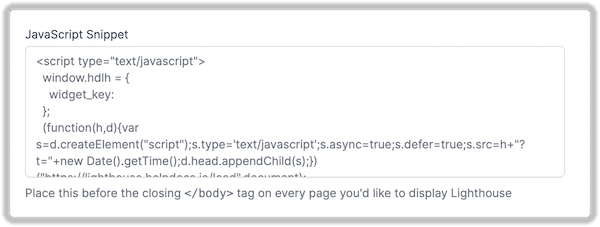
Setup
Setup is stupidly simple.
Copy, paste, customize. You'll be up and running in minutes.
- 1
Copy the snippet
Grab your unique widget code from your HelpDocs dashboard.
- 2
Paste into your app
Drop it into your HTML. Works with React, Vue, Angular, or vanilla JS.
- 3
Customize (optional)
Use the Widget API to match your brand and control behavior, or let it work out of the box.
Use cases
Build in-app help experiences that make sense.
Because you drive Lighthouse from your own UI, you can put the right knowledge base content in front of customers at exactly the right moment.
- 01
In-app help button
Add a persistent help launcher that opens Lighthouse wherever customers need it.
- 02
Contextual help
Open the article or category that matches where someone is in your app.
- 03
Error recovery
When something breaks, deep-link the message straight to the troubleshooting guide.
- 04
Onboarding flows
Surface getting-started guides right inside your onboarding, without a redirect.
- 05
Feature discovery
Point customers to the docs the moment they find a new feature.
- 06
Deflect before contact
Let customers search answers first, then reach the contact form only if they still need it.
Start building your documentation infrastructure.
Create, organize, translate, and connect your docs without the admin sprawl of a support suite.
No credit card required.



