

AI knowledge base: the foundation your AI agent reads from
An AI knowledge base is a documentation system whose content is structured to be read by AI as well as by people, so that an AI agent, chatbot, or assistant can retrieve accurate answers from it instead of generating them. It combines the usual help-center features with AI-assisted authoring, machine-readable structure, and a retrieval interface that grounds answers strictly in published content.
Most AI support rollouts don’t fail on the model. They fail on the content the model reads. Connect an agent to your knowledge base, ask it five questions real customers ask, and the usual result is two good answers, two hedges, and one confident invention.
The fix sits upstream of the AI. Gartner found that 91% of customer service leaders are under pressure to implement AI in 2026, and the teams getting a useful result are the ones whose documentation was already in order. So this page is the audit to run before you wire an agent to anything: the three layers that have to hold up, then nine checks with a way to test each one.
What is an AI knowledge base?
An AI knowledge base does two jobs at once. It’s still a help center that people read, and it’s also the source an AI retrieves from when someone asks a question in plain language. The second job is the new one, and it changes what “good documentation” means.
A traditional knowledge base is judged by whether a person can find the right article. An AI knowledge base is judged by whether a machine can find the right passage, because that passage is what the answer gets built from. An article that a person would eventually piece together from three sections is an article an AI will answer badly.
The word doing the work here is grounded. A grounded system retrieves from your published content and answers from those passages, then links to the article it used. An ungrounded one answers from whatever the model absorbed in training, which is where invented policies and imaginary settings come from. If you take one thing from this page: the quality ceiling of a grounded AI is set by your content, not by the model.
Note
If you’re earlier than this and still deciding what a knowledge base is for, start with what a knowledge base is and how to build one. This page assumes you already have documentation and want to know whether an AI can use it.
Why AI-powered knowledge bases fail
The failure is rarely dramatic. Nobody gets a wildly hallucinated answer on day one and shuts the project down. What happens instead is that the AI is mostly right, in a way that’s hard to measure and slowly erodes trust, until people stop asking it and go back to opening tickets.
Three causes cover almost all of it, and none of them are model problems.
- The answer isn’t written down. A retrieval system cannot improve on a gap. It will either say it doesn’t know, which is the good outcome, or reach for something adjacent and confidently wrong.
- The answer is written down three times, differently. Old and new versions of the same policy both sit in the knowledge base, contradicting each other. Retrieval has no way to know which one you meant to keep, so it picks one.
- The answer is there but unreachable. It’s the third paragraph of a long page, or a line inside a screenshot, or in an article nobody set permissions on so the agent can’t see it.
The first of those is the most common, and it’s measurable. Gartner found that 43% of customers couldn’t find content relevant to their issue in self-service (Gartner).
That gap has been measured from three directions, and the shape of it is the reason AI struggles:
Almost everyone tries self-service (Harvard Business Review puts it at 81%), under half find what they need, and only 14% of issues are fully resolved that way. An AI sitting on top of that content inherits all three numbers.
Your agent doesn’t know your product
This is worth saying plainly because it gets assumed away. A language model knows a great deal about software in general and nothing specific about yours. It has never seen your pricing tiers, your refund window, or the setting that’s three menus deep.
Every accurate answer it gives about your product came out of your documentation on the way past. Retrieval is not the AI remembering. It’s the AI reading. When the reading material is thin, the answers are thin, and the model’s fluency makes thin answers sound authoritative.
The three layers of a knowledge foundation
Your knowledge base used to be a place people visited. Now it’s the database your AI reads from, which is a change in what documentation is for. Treat it like any other production system: known owners, review cycles, access rules, and some way to tell when it’s wrong.
That breaks into three layers, and they fail in order. There’s no point tuning retrieval if the answer was never written.
| Layer | The question it answers | Fails as |
|---|---|---|
| Content | Is the answer here, and is it correct? | Gaps and contradictions |
| Structure | Can a machine find the right passage? | Right article, wrong answer |
| Access | Can the AI reach it, and only the parts it should? | Silence, or a leak |
Most teams jump to the third layer, because connecting a tool feels like progress and rewriting documentation doesn’t. The nine checks below run in the same order as the layers, so you find the cheap problems before the expensive ones.
Info
Checks 1 to 3 are the content layer, 4 to 6 the structure layer, and 7 to 9 the access layer. If you only have an afternoon, do the first three. They account for most bad answers.
Nine checks before you ship an AI agent
Run these against your real knowledge base, not a sample. Each one has a way to test it that takes minutes, and each will tell you something you can act on this week.
Tick them off as you go. Nothing is saved when you leave, so if you want a record, screenshot it or copy the list into your own tracker.
1. Every question customers actually ask has an article
Not every question you think they ask. The two lists differ more than most teams expect, and the gap is where your AI will improvise.
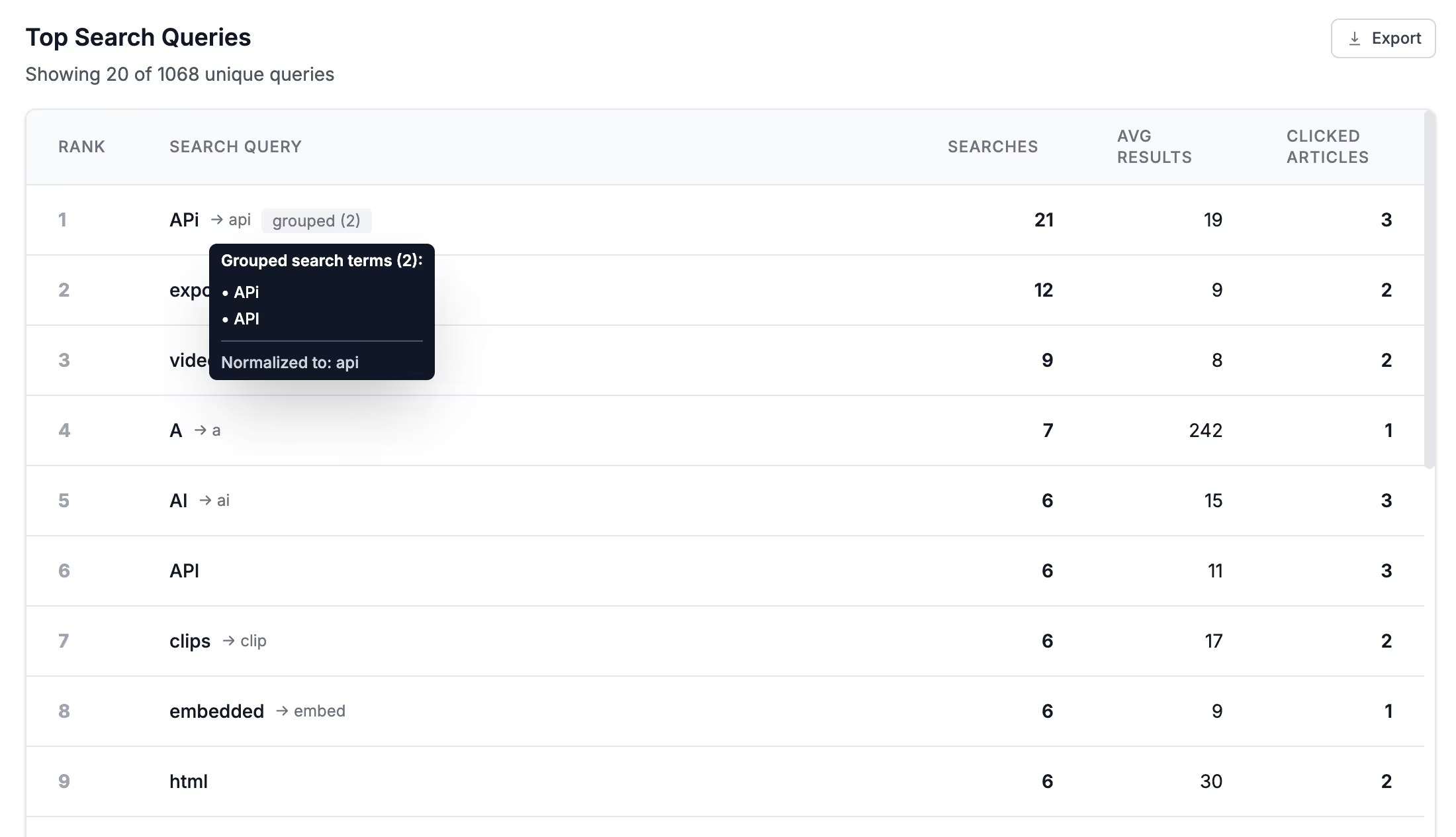
How to check: pull your no-result searches and your top ten ticket drivers from the last quarter, then find the article that answers each one. Anything without a match is a gap the AI cannot fill. Search analytics reports the searches that came back empty, and fixing no-result searches covers how to work the list down.
2. Each question has exactly one answer
Duplicates are worse than gaps. A gap produces “I don’t know.” A contradiction produces a confident answer that happens to be the outdated one.
How to check: search your knowledge base for your five most important topics and count how many articles could plausibly answer each. More than one means retrieval is making an editorial decision you didn’t make. Merge them, or delete the loser.
3. Every article answers its own title in the first paragraph
Retrieval works on passages, and the opening passage is the one most likely to be pulled. If your article opens with background and reaches the answer in paragraph four, the AI may well answer from the background.
How to check: read only the first fifty words of ten articles and ask whether the title’s question is answered. This also helps human readers: Nielsen Norman Group found that writing concisely, scannably, and objectively improved measured usability by 124% (Nielsen Norman Group).
4. Headings describe content, not structure
“Overview”, “More information” and “Additional notes” tell a retrieval system nothing. Headings are one of the strongest signals for locating the right passage, and generic ones waste that signal.
How to check: list your H2s with the article titles removed. If you can’t tell what a section covers from its heading alone, neither can the AI.
5. Articles use the words customers use
Your team writes “deprovision a seat.” Customers search “remove someone.” When the article never contains the customer’s phrasing, retrieval has less to match against. Nielsen Norman Group’s guidance on writing for findability is blunt about this.
How to check: take the top twenty queries from your search analytics and grep your content for each exact phrase. Missing phrases go into the article body, headings, or search tags, in the customer’s words rather than yours.
6. Nothing important lives only in an image, video, or PDF
Retrieval reads text. A price in a screenshot, a step shown only in a video, or a policy trapped in an attached PDF is invisible to the answer, however obvious it looks to you.
How to check: pick three facts that appear only in a visual and ask the AI about them. If it can’t answer, that content needs a text equivalent, which your screen-reader users needed anyway.
7. Every article has an owner and a review date
Stale content doesn’t announce itself. It gets served confidently for months after the product changed, and it’s the single most common cause of an AI answer that’s wrong on today’s facts.
How to check: sort by last-updated and count what hasn’t been touched in twelve months. Then check that number against how often your product ships. Anything customer-facing and older than your release cadence is a candidate for review.
Warning
Watch for the article nobody dares delete. An old version of a process kept “just in case” is the most common source of two contradictory answers, and retrieval has no way to tell which one you meant to keep.
8. Access rules match the audience
An AI answering from your content will happily surface anything it can read. Internal pricing notes, unreleased features, and staff-only procedures all become customer-visible if the boundary isn’t enforced where the content lives.
How to check: ask a customer-facing agent something only staff should know. If it answers, fix it with permission groups and SSO rather than by asking the AI to keep a secret. Audit trails tell you who changed what afterwards.
9. The AI can actually reach your content
The last layer is plumbing, and it’s the only one where the tooling matters more than the writing. Your content needs a machine-readable route in: a protocol, an API, or clean markup that isn’t buried in page furniture.
How to check: connect the agent, ask five real questions, and read the citations rather than the answers. Right answer from the wrong source is a problem you want to find now, not in three months.
Tip
Keep those five questions written down and re-run them after every content change. It takes two minutes and it’s the closest thing to a regression test documentation has.
How to connect your knowledge base to an AI chatbot
Once the content holds up, wiring it in is the short part. There are four routes, and they’re not exclusive.
- Use the AI already in your knowledge base. Ask AI answers questions from your published articles in plain language and links the source it used. Nothing to integrate, and the grounding is handled for you. The Lighthouse widget puts the same thing inside your app, where the question actually occurs.
- Connect an assistant over MCP. The Model Context Protocol lets an outside assistant search and read your articles directly. Claude is the clearest example: connect over HelpDocs MCP and it answers from your approved documentation with the source article attached, rather than guessing. Any MCP-compatible client works, so one setup covers the assistants your team already has open, which makes this the route for internal use too.
- Feed your own stack through the REST API. If you’re building the chatbot, the API gives you articles and search results to ground it on. You own the prompt and the interface; retrieval still comes from published content.
- Publish for crawlers and assistants you don’t control. On every plan your knowledge base publishes an
llms.txtindex and clean markdown, so an assistant arriving without an integration still finds structured content instead of scraping your navigation. Keep your expectations calibrated here: the evidence on llms.txt says almost nothing fetches it yet, and Google ignores it outright. The agents are reading your docs anyway: AI agents made about one in five knowledge base pageviews in our 2026 research.
The pattern is the same in all four: retrieve from published content, answer from those passages, cite the article. Anything that skips the retrieval step is guessing with better grammar. How AI uses your knowledge base goes deeper on the mechanics.
Choosing AI knowledge base software
Three questions separate the tools once you’re comparing seriously. Is the AI grounded in your content, and does it cite what it used? What does it cost when people actually use it, per resolution or included in the plan? Can you turn it off for a topic where you’d rather send someone to a human?
We compared ten tools on exactly that in best AI knowledge base software, competitors included and pros and cons for each. If you want the HelpDocs answer specifically, HelpDocs AI covers drafting, rewriting, metadata, and Ask AI, and pricing has the plans with AI credits spelled out.
Whichever you pick, the nine checks above don’t change. They’re about your content, and your content is the part that moves with you.



