






10 yearsRunning knowledge bases since 2016

Enterprise knowledge management software your team can run on day one.

HelpDocs gives you the controls a security review asks for: SSO, SCIM, an audit trail and approvals. The price is on the page, and there's no sales cycle between you and a pilot.

Employee, signed in with SSO

Dana, FinanceSAML SSO · Accounts payable
AI Answer

Check the PO has a number before any transfer is made, then approve it from your pending approvals list.

How to approve a PO

Using HelpDocs Ask AI

Your identity provider

SCIM· synced just now
  • Priya Kadam · Provisioned
  • Dana Reyes · Added to Accounts payable
  • Liam Hart · Deprovisioned

With single sign-on. See access control

Your HelpDocs knowledge base
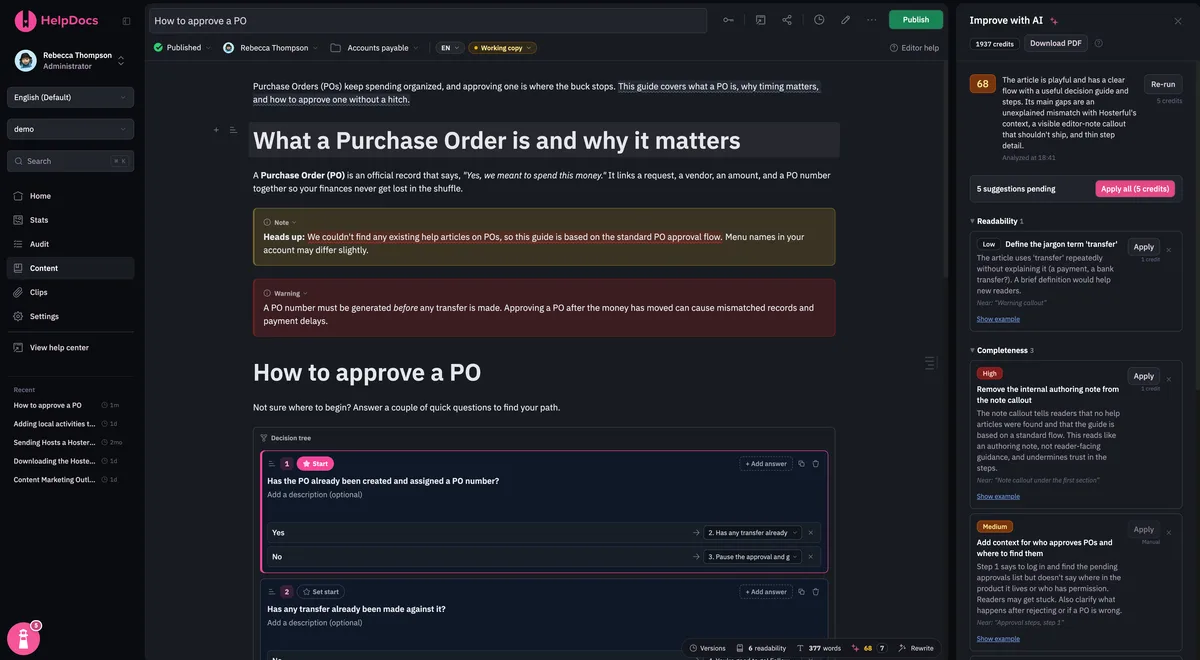
The How to approve a PO article open in the HelpDocs editor, with Improve with AI suggestions alongside
PublishedHow to approve a PO

Connected across your organization

Approvals

Working copy · review requested from Finance
Approved by Sam, Finance↳ How to approve a PO

Nothing goes live until a reviewer signs it off.

Your AI assistant

Add a step to the PO approval article: generate the PO number before any transfer
✓ helpdocs · search("approve a PO")✓ helpdocs · update_article(working_copy)Done. I added it as step 1 and saved a working copy for Finance to review.↳ How to approve a PO

Enterprise pricing, worked out in the open.

Most documentation platforms keep enterprise pricing behind a sales call. Ours is right here: start from the base, add what you need, and your quote is the sum of what you pick, at the same prices for every company.

In the base

$1,250/month, billed annually

That's $15,000 a year.

  • 50 named users, editors or read-only
  • Unlimited anonymous readers, free
  • Unlimited revision history
  • Unlimited stats history
  • 20,000 AI credits a month
  • 500 machine translations a month
  • 10 additional domains
  • 2 sandbox accounts
  • SCIM provisioning
  • Priority support
  • PO and invoice billing
  • Written security reviews and a signed DPA
  • SOC 2 and ISO 27001 certification (in progress)

No surprises. No discovery call before a number, and no price that depends on your logo: what you pick is what you pay.

Plus everything on this page, from Ask AI and the Lighthouse widget to advanced permissioning and the audit trail.

Add what you need

More accounts
From $299/month each, billed annually. A knowledge base per brand or region, sharing the parent account's users.
More users
From $25 per user a month, with volume discounts as your team grows.
More AI credits, domains and sandboxes
Priced per item on your quote, so you only pay for the extra you use.

Try it free for 14 days, then when you're ready to move to Enterprise.

Enterprise pricing across documentation platforms
PlatformEnterprise price
HelpDocsFrom $1,250/month, published
MintlifyContact sales
GitBookCustom quote
ReadMeContact sales
Document360Quote only, for every plan
HelpjuiceNo enterprise plan

From each vendor's own pricing page, checked October 24, 2026. Helpjuice's top plan is $799/month, with no tier above it.

Enterprise software without the enterprise bloat.

No sales call, no lead times. Use it on day one without a hefty pipeline, heavy user manual, or hidden pricing.

“We very rarely touch this system as it does just work.”
KrystalAdam T., Krystal

Identity

Let identity handle access.

Sign people in with the tools they already use, and let who they are decide what they can see.

  • Single sign-on

    Connect your identity provider.

  • SCIM provisioning

    Your identity provider creates, updates and removes users for you.

  • Embedded SSO with JWT

    Log your own users into private docs, with no second login.

  • Logged-in-only access

    Nothing is public until you say so.

  • Default roles and email domains

    New teammates land with the right permissions, from approved domains only.

Explore access control

Scale

Built to scale.

Launch days and front-page moments are on us. We handle the traffic and the surges, and you get the tools to run a knowledge base of any size.

  • Thousands of readers, no per-reader fees

    Anonymous readers are unlimited and free. You pay for named users who sign in.

  • Everything in bulk

    Move, retag, translate or update dozens of articles at once.

  • New regions in seconds

    Machine translation turns a whole selection of articles into another language in seconds.

  • Load in milliseconds

    Every article is cached, and our latest work made pages load up to 85% faster.

Check live status

Everyone sees only what's theirs.

Split one knowledge base between customers, partners and every internal team, with access decided by who people are rather than by which link they have.

Preview as

Marketing3 of 5 visible
Getting startedPublic docs
Campaign briefMarketing
Billing & refundsBilling
Partner portalPartners
Incident runbookOps

Groups that mirror your org chart

Put people in permission groups by team, region or customer tier, and each group sees only the articles meant for it.

Enforce on descendants

Lock a category once and its permissions apply to every category and article inside it, including ones added later.

Restrict by role

Grant access to Admins, Editors or Viewers as well as to groups, so a new hire is covered without anyone naming names.

Read-only members

Add people to a group as read-only, so they can see sensitive articles without being able to change them.

Groups from your identity provider

Sync groups from your identity provider with SCIM, or pass them in a JWT, so access follows your directory and your own business rules.

One knowledge base, every audience

Customers, partners and employees read from the same knowledge base, each seeing their own version of it.

See how access control works

Knowledge management governance, built in.

Know who changed what, decide who signs off, and catch content before it goes stale. No add-on, no separate compliance module.

Audit trail

Every publish, permission change and login, with who did it and when. Export it to CSV for your auditors.

Version history with side-by-side diffs

See exactly what changed between two versions of an article, and restore the old one in a click. Enterprise keeps every version, with no cap.

Unlimited on Enterprise

Approval workflows

Route an article to a reviewer before it goes live. Changes to published articles wait as a working copy until someone signs off.

Comments on articles

Discuss a change on the article itself, pinned to the version it was about, instead of in a Slack thread nobody can find later.

Guardrails

Pin a comment to the top of an article, and anyone about to publish reads it first. It stops well-meant updates going live when they shouldn't.

Stale content flags

Mark an article as out of date, or set a review date, and it lands in a list for its owner to fix.

From Q1 to Q4, see what's actually happening.

Know what people read, what they can't find and what's going stale, across every team and every quarter, without exporting to a spreadsheet first.

History

Every quarter, side by side

Enterprise keeps your whole stats history, so this year's Q4 sits next to last year's without an export.

Unlimited on Enterprise

Segments

By team, group or category

Slice any report by the users and groups reading it, one category tree, or the exact articles you care about.

Search

What people can't find

Searches with no results show the questions your knowledge base doesn't answer yet, ranked by how often they're asked.

Content health

What's going out of date

Article age, aging-content alerts and stale flags show which parts of the library need an owner's attention.

AI

Which AI assistants use your docs

See how often ChatGPT, Claude and other assistants reference your articles, and which ones they cite most.

Reporting

Clean numbers, ready to share

Spam and bot filtering keeps the counts honest, and every report exports to CSV for your own dashboards.

See every report

AI where you want it. Off where you don't.

Every AI feature in HelpDocs has its own switch in your AI settings. Turn on what your AI policy allows, leave the rest off, and change it whenever the policy does.

  • One switch per feature. Drafting can be on while Ask AI stays off. Nothing comes as a bundle you have to accept.
  • Off means off. Switch a feature off and it stops for everyone straight away, with nothing else to unpick.
  • Your house style, built in. Write your style rules once, then enforce them on every AI draft and rewrite so it all sounds like your company.
  • Credits included. Enterprise includes 20,000 AI credits a month, so turning a feature on doesn't start a new contract.
See every AI feature

Built for the largest teams.

Thousands of users and thousands of articles is a normal day for HelpDocs, not a special project.

Users

Thousands of users

Editors, reviewers and logged-in readers across every team, provisioned from your identity provider and grouped by what each one should see.

Content

Thousands of articles

Search, bulk actions and permission groups stay fast as the library grows, so the thousandth article is as easy to manage as the tenth.

Accounts

Many accounts, one team

Run a separate knowledge base for each brand or region, with the parent account managing everyone's access in one place.

Engineered for scale.

Big launch? Front-page moment? Bring it on. We look after the traffic, the servers, and the surges, so your knowledge base stays quick when everyone turns up at once. You do nothing. That's rather the point.

Load in milliseconds

Every article is cached and served in a flash, so pages appear the moment readers ask for them. Our latest work made them load up to 85% faster.

Status we're proud of

99.99% uptime across everything we run, tracked right out in the open.

All systems operationalCheck live status

Billions of pageviews, handled

We've delivered billions of pageviews for knowledge bases of every size, from scrappy startups to names you'd recognize. Yours is in good company.

Fits the systems you already run.

Connect HelpDocs to your identity provider, service platforms and enterprise AI, so one set of approved answers reaches every channel your employees and customers use.

Enterprise AI

Ground your AI assistants in the answers your team has reviewed and approved, instead of whatever they find.

Service platforms

Put the same approved answers in front of agents and customers, inside the service platform you already run.

Workplace collaboration

Let employees search and share articles from Slack and the browser, and translate content with your localization vendor.

Customer data and adoption

Send help center activity to your customer data platform and digital adoption tools, so support insight sits next to product data.

Plus SAML, OpenID Connect and JWT for single sign-on, and more integrations.

Why teams move from an enterprise suite.

Support suites are good at a lot. The trouble is what it takes to get a governed knowledge base out of one, and what you pay per seat while you do.

Savings calculator

What would you save?

Count everyone who signs in, split into editors and named read-only users. Readers who don't sign in are anonymous and free on HelpDocs, so leave them out.

1. What are you using today?
2. Who signs in?
We've filled this in from Zendesk Suite Professional's list price (October 2026). Change it if you pay something different.
Zendesk Suite Professional (estimate, see note below)
$165,600 /year
120 seats × $115 × 12 months
HelpDocs Enterprise
$20,160 /year
  • Base, includes 50 users ($1,250 × 12)$15,000
  • Editors 51–60: 10 × $25 × 12$3,000
  • Read-only 1–60: 60 × $3 × 12$2,160
You'd save
$145,440 /year

Estimated from list prices (October 2026), billed annually. It doesn't account for discounts or special deals you may have with your current vendor, so check your price with them first.

Editors fill the 50 included users first, then read-only users. Beyond that, HelpDocs uses our published volume pricing: editors from $25 down to $15 a month, and named read-only users from $3 down to $1.

Today's cost counts everyone who signs in at your seat price. If your read-only users are on cheaper or free seats with your current vendor, lower the price to match. If those seats also run ticketing or chat, you'll still need them for the people who use them.

HelpDocs compared with enterprise support suites
Before you signHelpDocsEnterprise suites
Buy a knowledge base on its ownYesSalesforce and Zendesk sell it inside a support suite
See the price before a sales callYes. Enterprise starts at $1,250/moDocument360 and Zendesk Enterprise are quote-only
Pay for the people who readNot for anonymous readers. Named users who sign in count as usersSalesforce licenses customers who log in
Audit trailIncludedZendesk keeps it for Suite Enterprise
Approval workflowIncludedMature in Salesforce, Enterprise-only in Zendesk
SCIM provisioningEnterprise planAll three support it

Competitor details from each vendor's own pricing and documentation, as of October 2026.

Zendesk Guide

Migration

Leaving an enterprise suite is the easy part.

Zendesk Guide, Document360 and every tool above have built-in importers. Connect the old account and HelpDocs copies your categories, articles and images across, so what's left is review, redirects and a design pass, not a migration project. Anything else, including Salesforce Knowledge, can come in through the CSV importer.

See every migration route

Files

Bring the Word docs and PDFs too.

Policies, SOPs and handbooks usually live in files, not a help desk. Drop in a .docx, .pdf, .md, .html, .rtf, .odt or .txt and HelpDocs turns it into a clean article you can edit, permission and publish.

Comments and Guardrails

Review in the article, not in a thread nobody can find.

Select any sentence to comment on it, @mention a teammate, and resolve the thread once it's fixed. Pin a comment as a Guardrail and it sits at the top of the article, so anyone about to publish reads it first.

Priya pins a note about new approval limits, so whoever presses Publish sees it first.

Security review, legal and finance, without the back-and-forth.

Everything your security, legal and finance teams ask a new vendor for is ready before they ask. Start at the trust center, and we'll handle the rest, all in writing so every answer is on record.

Security

Security questionnaires, answered

Send us your vendor questionnaire and we fill it in, so your security team isn't chasing answers for weeks.

Privacy

A signed DPA in your account

Our signed DPA is waiting in your account. If legal needs to use yours, we'll sign it as long as it follows the GDPR standard.

Compliance

SOC 2 and ISO 27001 in progress

Both are underway. The trust center shows the controls we already run, our policies, and what we can share with you today.

In progress

Contracts

One order form, our MSA

Pay annually by invoice or purchase order on net 30 terms. No redlining marathon before your team can start.

Visit the trust center

Resources for running knowledge at scale.

Guides on governance, permissions and upkeep, and templates for the documents large teams write most. Free to read, whichever tool you use.

Enterprise knowledge base questions

Is HelpDocs SOC 2 or ISO 27001 certified?
Not yet: SOC 2 and ISO 27001 in progress. We'd rather tell you that than imply otherwise. You can follow the work and request our current security documentation on our trust center.
Can HelpDocs handle thousands of users and articles?
Yes. Some of the largest companies in the world run their knowledge bases on HelpDocs, with thousands of users and thousands of articles. Anonymous readers are free and unlimited. You pay for named users who sign in, whether they edit or only read.
Does HelpDocs support SAML SSO and SCIM?
Yes. SAML and OIDC single sign-on and embedded SSO with JWT are included. Automatic user provisioning with SCIM is on the Enterprise plan: your identity provider creates, updates and removes users for you.
What is enterprise knowledge management software?
It's the tooling a large organization uses to write, govern and find what it knows, across many teams and audiences. For most companies that means an enterprise knowledge base with access control, an audit trail and review workflows. Our guide to enterprise knowledge management covers the operating side.
How much does the Enterprise plan cost?
From $1,250 a month, billed annually ($15,000 a year). That includes 50 users, unlimited revision and stats history, SCIM provisioning, sandbox accounts and priority support. Extra accounts are from $299 a month each, billed annually, and you add more users, AI credits or domains as you need them. See how pricing works.
Do you offer on-premises hosting or custom development?
No. HelpDocs runs in our cloud, and every customer gets the same product and the same updates. We don't build custom features or agree custom SLAs, which is part of how we keep the price published and the product moving.
Do you offer calls or an account manager?
No. Support, onboarding and security reviews all happen in writing, so every answer is on record for your team and nobody has to find a time that suits three time zones. Priority support means your messages are answered first.
How long does a migration from Zendesk or Document360 take?
Both are built-in import sources, so you connect the old account and HelpDocs copies your categories, articles and images across. Most of the work after that is redirects and a design pass. The migration page lists what each route needs.

Start the process off today.

Create, organize, translate, and connect your docs without the admin sprawl of a support suite.

Start free 14-day trial

No credit card required.

Migrate from