

Help center software, and what separates the good ones
Help center software publishes and runs the public, branded site where your customers find answers themselves. It covers writing and organising articles, hosting them on your own domain, making them searchable, and reporting on what people looked for. It overlaps heavily with knowledge base software, and differs from a help desk, which manages the conversations that reach you rather than preventing them.
Every support tool claims to include a help center. Then you look closely and find a tab inside a ticketing product, with your logo in the corner if you pay for the higher tier.
That distinction matters more than the category name suggests, because a help center is the only part of your support stack customers actually see. This is what help center software has to do, how it differs from the two things it gets confused with, and the questions worth asking before you commit.
What is help center software?
Help center software publishes and runs the public, branded site where customers find answers themselves. Writing and organising articles, hosting them on your own domain, making them searchable, and reporting on what people looked for.
It sits between two things it’s routinely mixed up with:
- A help desk manages conversations. Tickets, inboxes, assignment, SLAs. It handles the questions that reach you.
- Help center software publishes answers so fewer questions reach you at all.
- Knowledge base software is the broader category, covering both public help centers and private internal documentation. Our guide to knowledge base software covers the whole category and how the four types differ.
Help center specifically implies the customer-facing half: public, branded, indexed by Google, and designed for someone who has never seen your admin interface.
Info
“Help center” and “knowledge base” are used interchangeably by most vendors, and that’s fine. “Help desk” is a different product. If a comparison blurs those two, it’s usually because the tool is strong at one and weak at the other.
Why the public half is worth taking seriously
Self-service is the first thing customers try, not the fallback. Harvard Business Review found that 81% of customers try to handle an issue themselves before contacting a live agent (Harvard Business Review), and Zendesk found that 91% would happily use a knowledge base if it met their needs (Zendesk).
The gap between that willingness and the result is where the money is:
Gartner found 43% of customers couldn’t find content relevant to their issue in self-service (Gartner). Nearly everyone wants to self-serve, and nearly half fail. That failure is a findability problem, which is a software and content problem rather than a demand problem.
What help center software has to do well
Six things, and they’re worth checking in a trial rather than on a feature page.
- Publish to your own domain, on your brand.
help.yourcompany.com, your typography, your colours, no vendor badge. A help center on someone else’s subdomain sends your SEO equity to them and looks like an outsourced afterthought. - Search that survives real phrasing. Customers type “cancel” when your article says “terminate subscription”. Test with your own support inbox’s actual wording, not the terms you’d choose.
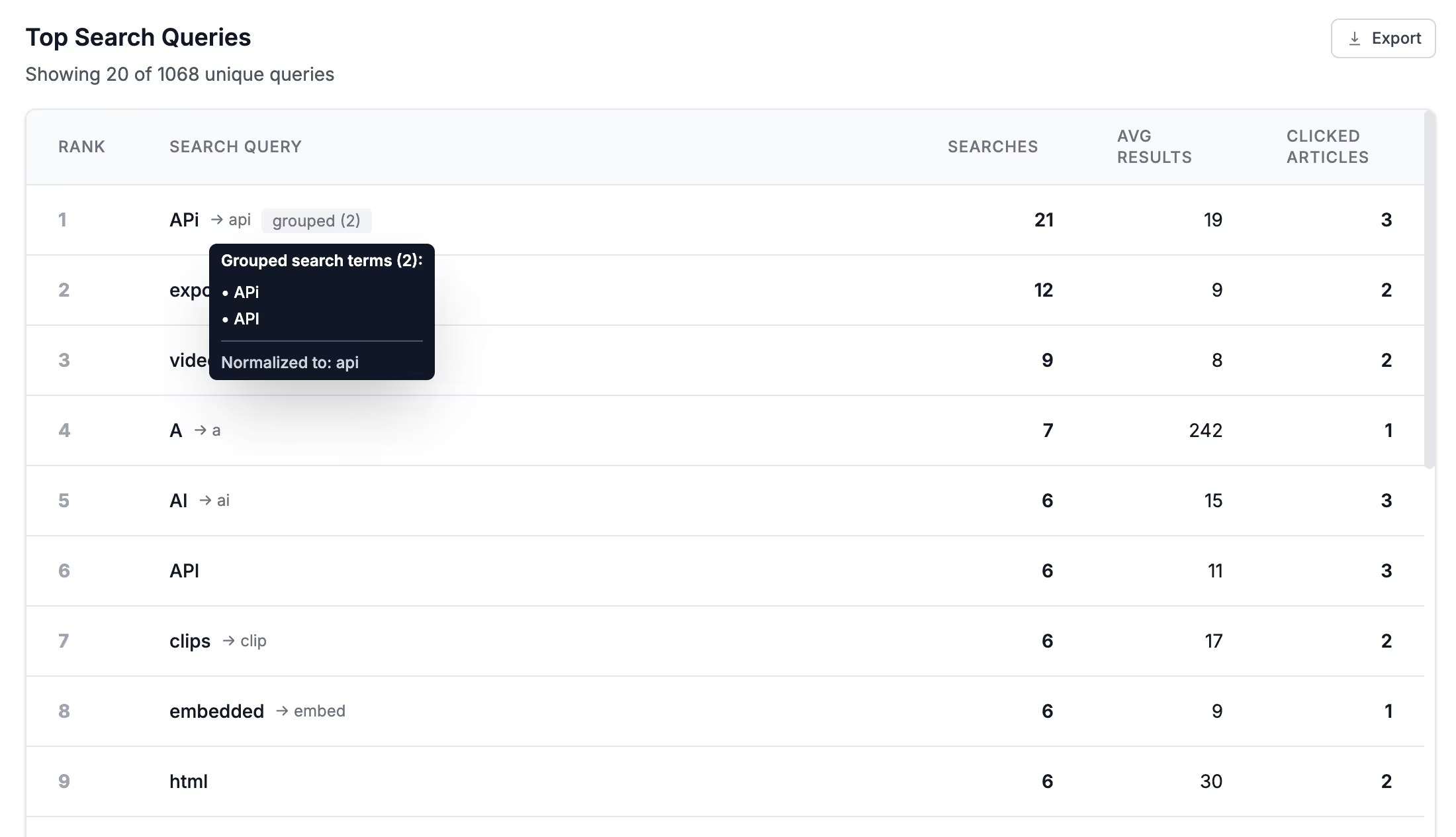
- Report the searches that failed. The queries that returned nothing are the single most useful report in this category, because they’re customers telling you exactly what to write next. Fixing no-result searches covers how to work the list.
- Answer inside your product, not only on a separate site. Most questions happen mid-task. A widget like Lighthouse puts the answer where the confusion is, which deflects more than a link in the footer ever will.
- Real authoring tools. A usable editor, reusable snippets, a bulk editor for the day you rename a feature across two hundred articles, and permissions if any of your content is partner-only or internal.
- Speed and accessibility. Help centers are read on bad connections by frustrated people. This is also the half of SEO you control outright.
Tip
The best trial test takes ten minutes: import twenty real articles, then search for five things using the exact words from your last five support tickets. Tools differentiate on that far more than on feature lists.
What to ask before you commit
- Who owns the domain and the content? Check the export path before you import anything. Documentation outlives tools.
- What does the price do as you grow? Per-agent pricing on a publishing tool is odd, since publishing isn’t per-agent work. Watch for the features that only appear one tier up.
- Is AI included or metered? Per-resolution pricing means the month your deflection works well is also the month your bill rises.
- Can you turn AI off for a topic? Some subjects want a human, and that should be your decision.
- Multiple languages? If you sell internationally, retrofitting translations later is harder than starting with them.
Warning
Be careful with help desks that include a help center as a bundled extra. The ticketing is usually excellent and the publishing side is usually a tab, with limited templating and a subdomain you don’t control. That trade can be right, but make it deliberately.
Choosing between the tools
We keep this honest rather than pretending there’s one answer. If you need real ticketing as well as publishing, a suite is probably the right call and we’re not it. If the help center is the product surface you care about, a dedicated tool will do that part better.
For the actual comparisons, with prices and drawbacks for each tool:
- Best knowledge base software, twelve tools compared on setup, search, branding, and real pricing.
- Knowledge base software for customer service, scored on deflection and failed-search reporting.
- Free knowledge base software, what each free tier includes and exactly where it stops.
- Best AI knowledge base software, if AI answers are the deciding factor.
HelpDocs is a dedicated help center tool: Create, Manage, Connect, Govern, and Optimize cover the product, and pricing has the plans. There’s a 14-day trial and no free tier, so if free forever is a hard requirement, start with the free-software roundup above.
If you’re about to put AI in front of this content, read AI knowledge base first. The nine checks there are about your articles rather than your software, and they’re what decides whether the AI is any good.



